
Description :ATS Resume Format 2026: Complete checklist, headings, and layout designed to be easy for ATS software to read and parse – Free template inside
INTRO:
ATS software is used to collect, parse, rank and search applications, and a clean, keyword-matched resume is easier to find. In 2026, almost every company uses an Applicant Tracking System (ATS) to scan resumes. If your resume is not ATS-friendly, it may never reach the recruiter – no matter how qualified you are.
In this complete guide, you will learn exactly what an ATS optimized resume is, what ATS friendly means, the complete ATS resume format checklist for 2026, correct headings and layout, and where to get a free simple ATS resume Google Docs template designed for clean ATS parsing.
Table of Contents
What is an ATS Optimized Resume? What Does ATS Friendly Mean?
What is an ATS?
ATS stands for Applicant Tracking System. It is software that companies use to filter, scan, and rank resumes. When you apply online, your resume goes to ATS first, not to a human. ATS parses your resume, extracts information like Work Experience, Education, Skills, and checks for keywords from the job description. Resumes that are hard to read can be ranked lower or missed, so they may never reach the recruiter.
What Does ATS Friendly Mean? Real Example Included
An ATS friendly resume, also called an ATS optimized resume or ATS compliant resume, is a resume that ATS software can easily read and parse. It uses simple formatting, standard headings, plain text, and relevant keywords. It avoids images, tables, fancy fonts, and graphics.
Real Example of ATS optimized resume:
John Doe
Phone: +123-456-7890 | Email: john@example.com | LinkedIn: linkedin.com/in/johndoe
Professional Summary
Marketing professional with 5 years experience in SEO and content strategy…
Work Experience
Digital Marketing Specialist | XYZ Corp | Jan 2020 – Present
- Increased traffic by 150% using SEO and content strategy
- Managed content for 50+ blogs using Trello and Project Management
Education
Bachelor in Marketing | ABC University | 2019
Skills
SEO, Content Strategy, Google Analytics, Trello, Project Management, Slack
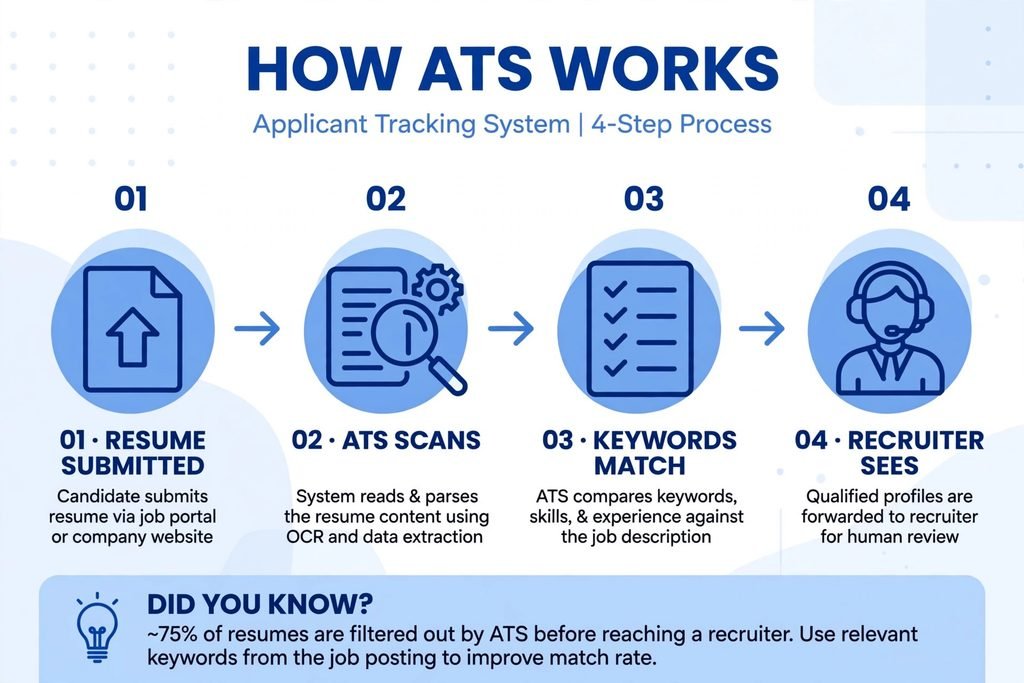
Description : How ATS works step by step resume scanning process
Why ATS Resume Format Matters in 2026?
In 2026, ATS systems use AI to check not just keywords but also if your headings are standard and if your layout is clean. If your resume fails ATS, you may never get an interview call, no matter how qualified you are. Jobscan’s 2026 ATS Usage Report detected an ATS at 97.4% of Fortune 500 companies (487 of 500), and resumes with images or tables can be harder for ATS software to read.
Source: Jobscan’s 2026 ATS Usage Report
Complete ATS Resume Format Checklist 2026 – 12 Rules for an ATS-Friendly Resume
1. Keep Your Layout Simple and Single-Column
ATS reads left to right, top to bottom. Use single-column layout. Our free ATS friendly resume template Word and Google Docs uses this exact layout.
2. Use Standard Headings That ATS Recognizes
Use exact standard headings: Contact Information, Professional Summary, Work Experience, Education, Skills. Do not use creative headings like My Professional Journey or Where I Have Worked.
3. Use ATS-Friendly Fonts
Use Arial, Calibri, Times New Roman. Font size 10.5-12pt. Avoid fancy fonts. Best font for ATS in 2026 is Calibri 11pt.
4. Save Your File in DOCX Format
Many ATS parse DOCX better than PDF. Save as .docx for ATS, .pdf for emailing. Our simple ATS resume free Google Docs template can be downloaded as both DOCX and PDF.
5. Do Not Use Images, Tables, Headers, Footers, or Graphics
ATS cannot read images, logos, photos, charts, or icons. Remove your photo – resumes with photos can be harder to parse and may reduce callbacks.
6. Add Keywords from the Job Description
If job says Project Management, Trello, SEO, Content Calendar, include those exact words. This is the secret to an ATS compliant resume. Use Jobscan to find missing keywords.
7. Avoid Columns and Text Boxes
Even if columns look modern, ATS cannot handle them. It will read left column completely then right column.
8. Use Simple Bullet Points
Use standard bullet points like • or -. Avoid custom icons, checkmarks, or emojis.
9. Put Contact Information in Main Body
Put name, phone, email, LinkedIn in main body at top, not in header or footer. Some ATS cannot read headers and footers.
10. Write Full Forms with Abbreviations
Write Search Engine Optimization (SEO) instead of just SEO. ATS catches both.
11. Use Professional File Name
FirstName_LastName_Resume.docx – Not Resume_Final_2.pdf
12. Test with Free ATS Checker
Use Jobscan, Resume Worded, or TopResume. Get ATS score and fix issues.
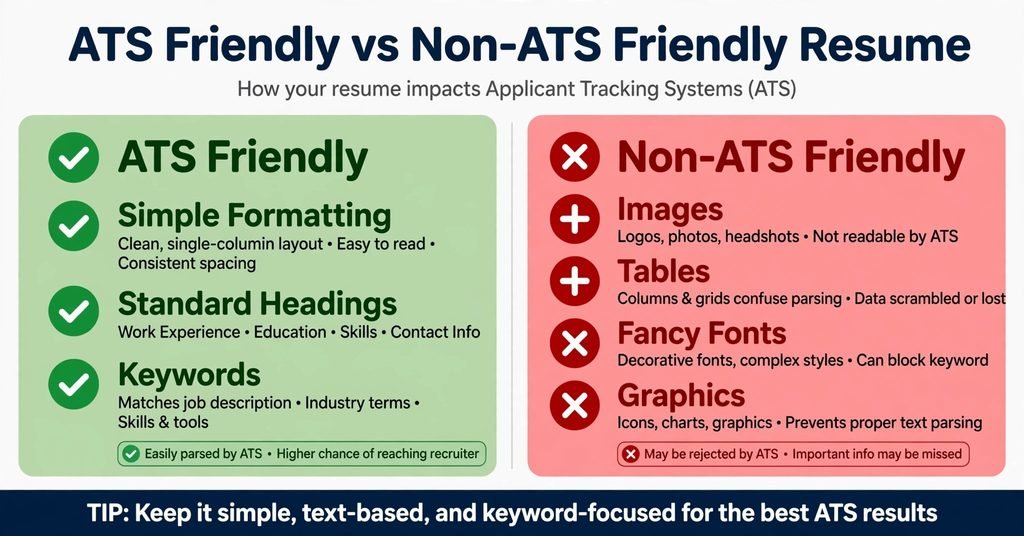
Description : ATS friendly vs non ATS friendly resume comparison
Where to Get Simple ATS Resume Free Google Docs Template?
What is Simple ATS Resume Free Google Docs Template?
A minimal, text-only template that is an ATS-friendly template designed for clean parsing. No images, no tables, standard headings, simple fonts. You can copy it, edit, and download as DOCX or PDF in 1 click.
Where to Get Free ATS Friendly Resume Template Word Google Docs?
- ResumeForg: Our templates are designed for clean ATS parsing. Go to resume templates section – Free, No Sign Up, No Watermark. Choose ATS-friendly template and download as DOCX.
- Microsoft Word: Microsoft offers official ATS resume templates and cover letters in Word format. Trusted and in Word format.
- TheGoodDocs: They offer Simple ATS Resume – Free Google Docs Template – Easy to use online.
Pro Tip: Use ResumeForg’s simple ATS resume free Google Docs template – Built for 2026 ATS AI, free, and no sign up.
ATS Resume Format: Checklist, Headings and Layout (2026) – In Detail
Correct Headings for ATS Resume Format
Must Use: Contact Information, Professional Summary, Work Experience, Education, Skills, Certifications (optional), Projects (optional)
Do NOT Use: My Professional Journey, Where I Have Worked, What I Learned, My Skills Arsenal
Ideal Layout for 2026
Top to Bottom: 1. Name + Contact (Phone, Email, LinkedIn, City) 2. Professional Summary (2-4 lines) 3. Work Experience (Reverse chronological – Latest first) 4. Education 5. Skills (Include keywords) 6. Certifications / Projects
No sidebar, no second column, single-column only.
Font and Spacing for ATS Compliant Resume
Font: Calibri 11pt or Arial 10.5pt is best for ATS in 2026. Spacing: Single line spacing, 0.5 inch margins, space between sections. Avoid double columns, heavy bold, italics everywhere.
Word vs Google Docs – Which is Better for ATS Friendly Resume Template?
Word Template: Better for ATS parsing, Offline editing, Microsoft official. Google Docs Template: Free, no software needed, Easy sharing, Simple ATS resume free Google Docs template. In general, DOCX is usually parsed more reliably than PDF. Use Google Docs to draft, download as DOCX for applying.
How to Check if Your Resume is ATS Friendly? Free Tools Included
Tools: Jobscan – Paste job description + resume > Get match rate. Resume Worded – Upload resume > Get ATS score + feedback. TopResume – Free resume review. Steps: Upload > Check score > Fix missing keywords > Re-check until the score improves.
10 Common Mistakes That Make Your Resume Fail ATS in 2026
- Using Images/Logos – ATS can’t read – Fix: Remove
- Using Tables/Columns – Data scrambled – Fix: Use bullets
- Fancy Fonts – Parsing fails – Fix: Use Arial/Calibri
- Wrong Headings – Section skipped – Fix: Use standard headings
- Header/Footer Contact – Missed by ATS – Fix: Put in main body
- No Keywords – Low rank – Fix: Add from job description
- Unprofessional File Name – Looks spammy – Fix: FirstName_LastName_Resume.docx
- PDF Only – Some ATS fail – Fix: Use DOCX
- Too Long – ATS truncates – Fix: 1 page fresher, 2 experienced
- Not Testing – Unknown errors – Fix: Test with checker
Final Thoughts – Build Your ATS Friendly Resume Today with ResumeForg
Now you know what is an ATS optimized resume, what ATS friendly means, what ATS compliant resume is, and the complete ATS resume format checklist headings and layout for 2026.
You also know where to get simple ATS resume free Google Docs template and free ATS friendly resume template Word.
Ready to build? Use ResumeForg’s free resume builder – Free, No Sign Up, No Watermark. Go to free resume builder, choose ATS-friendly template from resume templates, add summary using how to write a resume summary guide, add skills from 20 skills to put on resume guide, download as DOCX, test with free ATS checker, and start applying.
Frequently Asked Questions (FAQ) – ATS Resume Format 2026
What is an ATS optimized resume?
An ATS optimized resume or ATS friendly resume is a resume formatted so Applicant Tracking System can easily read, parse, and understand it. It uses simple layout, standard headings, text-based content, and relevant keywords. It avoids images, tables, fancy fonts, and graphics.
What does ATS friendly mean?
ATS friendly means your resume is designed to be easy for ATS software to read and parse. It means ATS software can extract your Work Experience, Education, Skills without errors. Simple ATS resume free Google Docs template is example of ATS friendly resume.
What is the best ATS resume format checklist headings and layout for 2026?
Best ATS resume format checklist 2026 includes: 1) Single-column layout 2) Standard headings (Work Experience, Education, Skills, Contact) 3) ATS-friendly fonts (Arial, Calibri) 4) DOCX file format 5) No images/tables 6) Keywords from job description 7) Professional file name. Layout: Contact > Summary > Work Experience > Education > Skills.
Where can I get simple ATS resume free Google Docs template?
You can get simple ATS resume free Google Docs template from ResumeForg templates section – Free, No Sign Up, No Watermark, designed for clean ATS parsing. Also from TheGoodDocs which offers Simple ATS Resume Free Google Docs Template and Microsoft Word official templates. Download as DOCX for best ATS compatibility.
What is ATS compliant resume?
ATS compliant resume is same as ATS friendly resume – It complies with ATS parsing rules. It means your resume follows standard formatting, headings, and keyword rules so ATS can read it. It is text-based, simple layout, standard headings, and keyword focused.
Is free ATS friendly resume template Word or Google Docs better?
Both Word and Google Docs templates are good for ATS, but Word DOCX format is slightly better for ATS parsing because most ATS systems prefer DOCX files. Google Docs template is free, requires no software, easy to share online, and you can edit anywhere. Best practice is to use simple ATS resume free Google Docs template to draft your resume online, then download it as DOCX format for job applications.
2 thoughts on “ATS Resume Format 2026: Checklist, Headings, Layout & Free Google Docs Template Designed for Clean ATS Parsing”