
You have spent days on your resume. The education is written, the skills are listed, the projects are in place, and the page looks right. Then you open your email, attach the file, and hesitate — because knowing how to send resume by email to employer is a different skill from writing the resume itself, and nobody ever taught you the second one. What goes in the subject line? How long should the email be? Do you write a cover letter in the body, or just say “please find attached”? What do you name the file, and does it matter?
These are small questions, and they decide whether your resume gets opened at all — and they are the questions this guide answers, because knowing how to send resume by email to employer is a skill of its own, separate from writing the resume. A resume sent with a blank subject line and a file named “Resume-final.pdf” can sit unopened in a crowded inbox, even if the resume itself is strong. A resume sent with a clear subject line, a short professional email, and a correctly named PDF gets read, because the person opening it can see in five seconds who you are and what you are applying for.
This guide covers the whole send, not just the attachment. It explains how to send resume by email to employer step by step: how to read the job posting first, how to write a subject line that says what the email is, how to write a short email body that introduces you without repeating your resume, how to name and attach the file, what not to send, and the final check to run before you press send. The examples use one fictional student, Jordan Lee, a final-year business student applying for an entry-level customer service role, so you can see the same application sent badly and sent well, side by side.
Nothing here asks you to paste your whole resume into the email body, and nothing here asks you to write a long cover letter when a short email will do — because that is the heart of how to send resume by email to employer: a short email, and a resume that does the talking once the reader is inside. The email is an introduction. The resume is the evidence. Keep them separate, and both do their job.
Table of Contents
The short answer to how to send resume by email to employer
The short answer to how to send resume by email to employer is this: use a professional email address, write a subject line with the job title and your name, write a short email of about 120 to 180 words, attach your resume as a PDF with a file name like Jordan-Lee-Resume.pdf, and check the recipient, the subject, and the attachment before you send. That is the whole process in one sentence, and it covers most applications, most employers, and most entry-level roles. It is not a guess. It follows from how hiring actually works. A recruiter opens dozens of application emails a day, often on a phone, and decides in seconds which ones to open first.
The subject line is what they see before anything else. The email body is what they read next, and they read it to decide whether the attachment is worth opening. The attachment itself is the last thing they look at, not the first. So the order of the work is the reverse of what most freshers expect: the subject line matters first, the email body matters second, and the resume matters third — because the first two decide whether the third is ever seen. That order is the first thing to understand about how to send resume by email to employer, and it shapes every section that follows.
There is a second reason the short answer works, and it is about respect for the reader’s time. A hiring manager who asked for applications by email did not ask for a second document. They asked for a resume, sent by email. An email that runs to five paragraphs, repeats the whole resume, or pastes a cover letter into the body is asking them to read the same information twice, in two places, before they have decided whether they are interested. A short email does the opposite. It says who you are, what you are applying for, why you are a reasonable fit in one or two lines, and that the resume is attached.
It takes the reader a minute, it answers the questions they actually have at that stage, and it leaves the detail where it belongs — in the attached document. That is the principle behind every section of this guide to how to send resume by email to employer: the email is a door, not a room. Make it easy to open, and let the resume do the talking once the reader is inside.
The rest of this guide walks through each part of the send in order, because the order matters. Read the posting first, because the employer may have given you the subject line, the file type, or the recipient, and their instructions beat every general rule in this post. Set up a professional sending address, because the address is the first thing the reader sees after the subject line. Write the subject line, then the body, then name and attach the file. Then run a final check, send a test email to yourself if you are unsure, and follow up once if you hear nothing.
Follow those steps, and the question of how to send resume by email to employer stops being a worry and becomes a routine you can repeat for every application.
Read the job posting before you write anything
Before you write a single word of the email, read the job posting again — all of it, including the part at the bottom that most applicants skip. The posting is the employer’s instruction sheet for how to send resume by email to employer in their case, and it often contains details that override everything in this guide. Some employers ask for a specific subject line, such as “Customer Service Associate — Jordan Lee — Ref CS-2026-114”. Some ask for the resume as a Word document instead of a PDF, because their system reads Word files more easily. Some give a file-naming rule of their own.
Some say to send the application to a named person, or to a specific address, or through a portal instead of by email at all. If the posting says any of these things, follow them. An application that ignores a direct instruction looks careless before the resume is even opened, and no amount of good writing in the body makes up for it.
The posting also tells you what to put in the email body, if you read it properly — and reading it for those details is the first practical step in how to send resume by email to employer. The job title is in the posting, and it belongs in your subject line exactly as written — not a shorter version, and not a version you made up. The reference number, if there is one, is in the posting, and it belongs in the subject line too, because it is how the employer’s system sorts applications.
The name of the hiring manager is sometimes in the posting, or in the email signature of the person who posted the job, and a greeting that uses a real name is always better than “Dear Hiring Manager” — though a plain “Dear Hiring Manager” is fine when no name is given, and far better than “Dear Sir/Madam” or no greeting at all. The skills the employer asks for are in the posting, and one or two of them belong in your email body as the reason you are a fit.
That is how the email earns its place: it is not a generic message sent to every employer, but a short note written for this job, and the posting is where you find the details that make it specific. Every part of how to send resume by email to employer that follows — the subject line, the body, the attachment — is built from what the posting says.
There is one more thing to check in the posting, and it is the deadline and the method. Some postings close on a date, and an email sent after it is wasted effort, however good the resume. Some postings say “applications by email only” and some say “no emails, apply through the portal” — and sending by email when the employer said not to is a fast way to be ignored. Some postings ask for extra documents, such as a cover letter, a portfolio, or a transcript, and those belong in the same email as attachments, or in the body if the posting says so.
Check all of this before you start writing, and you will not have to rewrite the email halfway through. The first step in how to send resume by email to employer is not writing. It is reading.
Use a professional email address
The email address you send from is part of the application, and it is the first thing the reader sees after the subject line. A professional address is simple: your first name and last name, at a well-known free provider, with nothing else added. Jordan Lee sends from jordan.lee@email.com. That is the whole pattern, and it is what a professional email for sending resume attachments looks like: simple, readable, and unmistakably yours. First name, a dot, last name, and a normal domain. It is easy to remember, easy to type, and it tells the reader who you are before they read a word of the email.
If your name is taken at your preferred provider, add a middle initial, or a number that means something to you, such as a graduation year — jordan.lee26@email.com — but keep it short and keep it readable. The test is simple: could a stranger read your address aloud over the phone without having to spell anything twice?
What does not work is an address that was funny when you were fifteen — and a careless address is one of the easiest mistakes in how to send resume by email to employer, because it is visible before the reader opens anything. An address built from a nickname, a gaming handle, a joke, or a band name tells the reader something about you, and it is not something that helps your application. It suggests you did not think about the impression the address makes, or that you did not care.
The same goes for an address that belongs to someone else — a family member’s address, a shared household address, or a university address that will stop working when you graduate. Send from your own address, one you will still be able to open in six months, because employers sometimes reply late, and an address that has expired by then is an application lost. If you do not have a professional address yet, creating one takes five minutes and costs nothing, and it is one of the cheapest improvements you can make to any application.
Two small details complete the sending address. The first is the display name — the name that shows next to your address in the recipient’s inbox. Set it to your full name, exactly as it appears on your resume, so the inbox shows “Jordan Lee” rather than a nickname or a blank. The second is your signature. A short signature is one of the quiet details of how to send resume by email to employer: your full name, your phone number, and the city you are based in, on separate lines, make it easy for the employer to reach you without opening the attachment, and the signature should match the contact details at the top of your resume.
Keep the signature to three or four lines. No quotes, no images, no long list of links. The signature is a practical thing, not a decoration, and it should look the same on every application you send. Our guide to the education section for students covers the same habit from the other side: keep your contact details consistent everywhere they appear, because an employer who finds two different phone numbers will not know which one to call.
How to write a subject line that gets your resume opened
The subject line is the most important line in the whole email, because it is the only line the reader sees before deciding whether to open it. A good subject line for a resume email answers three questions in one short line: what is this, what is the job, and who sent it. The formula that covers all three is simple — job title, your name, and the reference number if the posting gave one. “Customer Service Associate Application — Jordan Lee (Ref: CS-2026-114)” does the job in nine words. The reader knows what the email is, which role it is for, and who sent it, without opening it. That is what a subject line is for.
It is not a place to be clever, and it is not a place to be vague. It is a label, and a good label says exactly what is inside.
The vague subjects are the ones that get skipped, and they are the ones freshers write most often. “Resume” says nothing. The reader has fifty emails with that subject, and yours is one of them. “Job Application” is no better — it does not say which job, and a company hiring for six roles cannot sort it. “Please find attached” is worse, because it does not even say it is a resume. “Hello” and a blank subject line are the worst of all, and a blank subject line is also the most likely to be caught by a spam filter, which means your email may never reach the inbox at all. None of these subjects is rude.
They are all just unhelpful, and in a crowded inbox, unhelpful is the same as invisible — which is why the subject line is the first thing to get right when you are learning how to send resume by email to employer. When you are learning how to send resume by email to employer, the subject line is the first thing to get right, because it is the first thing the employer reads and the first thing that can go wrong.
A few rules keep the subject line working, and they are the rules that decide how to send resume by email to employer in practice, because the subject line is the first thing the employer reads and the first thing that can go wrong. Keep it under about 60 characters if you can, so it does not get cut off on a phone screen — the formula above is 62 characters with the reference number, which is fine, and shorter is better when there is no reference number to include.
Use the job title exactly as the posting wrote it, because the employer’s system may sort applications by that exact phrase, and a shortened or reworded title can land your email in the wrong pile. Put your name in it, because the employer will search for your name later and a subject line with your name in it is easy to find. Add the reference number if the posting gave one, in brackets at the end, because that is how many employers track applications. And do not use all capitals, exclamation marks, or words like “urgent” — they read as spam, and they make a professional application look like a marketing email.
A careers guide from Monster makes the same point in their step-by-step guide to emailing a resume the right way, which recommends the same formula — job title, name, and reference number — and warns against vague subjects that give the reader nothing to work with.
If you are applying without a specific posting — for example, sending a speculative application to a company you would like to work for — the formula still works, with one change. Use the kind of role you are asking about instead of a posted job title: “Speculative Application — Entry-Level Customer Service — Jordan Lee”. The word “speculative” tells the reader immediately that there is no posting to match it against, which is honest and saves them from searching for a reference number that does not exist. Keep the rest of the formula the same. Name, role, and clarity — that is all a subject line needs to do, and it does it in one line.
Get the subject line right, and you have answered the hardest part of how to send resume by email to employer before the reader has opened anything.
The short email body: what to write and what to leave out
The email body is short — about 120 to 180 words — and it has a simple structure: a greeting, one line saying what you are applying for and where you found it, one or two lines saying why you are a reasonable fit, one line saying the resume is attached, and a polite close with your contact details. That is the whole email, and it is the shape every answer to how to send resume by email to employer should take: short, specific, and easy to read. It is not a cover letter, and it is not a second copy of your resume. It is an introduction, and it should read like one.
The reader is busy, and they will spend less than a minute on it. Give them the facts they need in that minute, and leave the detail in the attachment where it belongs.
Start with the greeting. Use the hiring manager’s name if you know it — “Dear Ms. Rivera,” — and “Dear Hiring Manager,” if you do not. Both are professional, and both are better than “Dear Sir/Madam,” which reads as if the email was written in another decade, or “Hi there,” which is too casual for a first application. The greeting is one line, and it sets the tone for everything after it — which is why getting it right is part of how to send resume by email to employer, not a detail to rush past.
Get the name right if you use one: check the spelling against the posting or the company website, because a misspelt name in the first line is worse than no name at all.
The first sentence says what you are applying for and where you found it. “I am writing to apply for the Customer Service Associate role, which I saw advertised on your company careers page.” That is enough. It tells the reader the role, and it tells them where you found it, which matters more than it seems — and it is the first sentence of the body in every good answer to how to send resume by email to employer. — an employer who posted the role in three places wants to know which one worked.
If you were referred by someone, say so here: “Amara Chen, my final-year project supervisor, suggested I apply.” A referral in the first sentence is worth more than a paragraph of self-description later, because it is a real connection, not a claim.
The next one or two sentences say why you are a fit, and they should be specific. This is where most freshers go wrong, because they write something that could sit on any application: “I am a hardworking and motivated individual with excellent communication skills.” That sentence says nothing. Nobody can check it, nobody can remember it, and it could have been written by anyone.
A specific version says the same thing with evidence: “I am a final-year business student, and I spent the last year working part-time in a campus bookshop, handling customer queries, returns, and complaints.” That is one sentence, and it gives the reader three facts they can check — the degree, the job, and the work — and a reason to open the attachment. That is the kind of line that turns a generic email into a real answer to how to send resume by email to employer.
One more line, if you have it, should tie a skill from the posting to something you have actually done: “I also completed a short course in customer service communication, which covered handling difficult conversations.” That is the kind of line that makes an employer open the resume. The rest of the resume — the education, the projects, the skills — is in the attachment, and the email does not need to repeat it. Our guide to how to tailor your resume for each job explains the same principle for the resume itself: every line has to be written for this reader and this role, and the email body is no different.
Then one line about the attachment: “My resume is attached for your consideration.” That is all it needs to say. Do not write a paragraph about the attachment. Do not list everything that is in it. The reader can see the attachment, and they can open it. The line is there so they know it is attached and what it is — nothing more, and nothing less than the job requires, which is the standard for every part of how to send resume by email to employer.
Close politely, in two lines — the close is the last thing the reader sees, and a clean close is part of how to send resume by email to employer well. “Thank you for your time and consideration. I would welcome the chance to discuss the role, and I can be reached at jordan.lee@email.com or on +1 555 014 8820.” Then your name, on its own line, and your signature below it. That is the whole email. About 150 words, five short paragraphs, and nothing the reader has to work to understand.
A guide from Enhancv gives the same structure in their seven-step guide to how to send a resume by email in seven steps, which recommends a 120 to 180 word body with a personalised greeting, a short introduction, and a clear mention of the attachment — and warns, as this guide does, against pasting the whole resume into the email. The structure is the same because the problem is the same: how to send resume by email to employer without asking the reader to read the same information twice.
What not to paste into the email body
The most common mistake in a resume email is pasting the whole resume into the body of the email, below a short introduction. It looks helpful — the reader can see everything without opening the attachment — but it is not helpful at all. It makes the email long, it makes the formatting break, and it means the reader sees your resume twice: once in a broken email format, and once in the attachment, which is how it was meant to be read. Worse, it means the employer now has two copies of your resume, and they will not know which one is the real one. Keep the resume in the attachment, and keep the email short.
The body introduces you. The attachment presents you. That division is the heart of how to send resume by email to employer, and breaking it is the fastest way to make a good resume look careless.
The same rule applies to cover letters. If the posting asked for a cover letter, send it as a separate attachment, or write it in the email body if the posting says to — but do not do both, and do not paste a cover letter into the body when the posting asked for it as an attachment. If the posting did not ask for a cover letter, a short email is enough, and a long cover letter pasted into the body is more likely to hurt than help. The employer asked for a resume by email. Give them a resume by email, with a short introduction.
Anything else is extra work for the reader, and extra work is not what gets an application read.
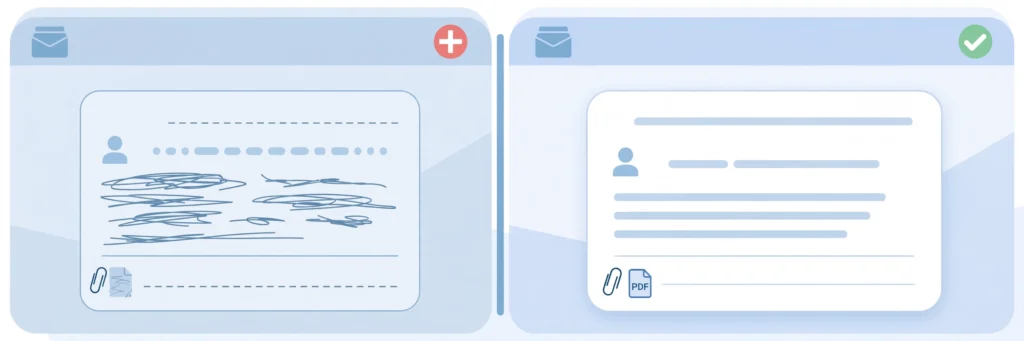
Before and after: the same application sent two ways
The difference between a good resume email and a bad one is easier to see than to describe, so here is the same application — Jordan Lee, final-year business student, applying for the Customer Service Associate role at Northgate Retail — sent two ways, because seeing the difference is the fastest way to learn how to send resume by email to employer. The resume attached to both emails is identical. The only difference is the email. Read both, and notice how much of the difference is in the subject line and the first two lines, not in the resume at all.
The weak version is what many first-time senders actually write. The subject line is “Resume”. The body is three lines long, with no greeting, no role, and no reason to open the attachment. The file is named “Resume-final.pdf”, which tells the employer nothing about whose resume it is. Here it is, exactly as it would arrive:
Subject: Resume
Hi,
Please find my resume attached for your kind consideration.
Thanks,
Jordan
There is nothing rude in that email, and there is nothing wrong with the resume attached to it. But there is also nothing in it that helps the reader. They do not know which role Jordan is applying for, because the subject line does not say and the body does not say. They do not know where Jordan found the role, or why Jordan is a fit, or what Jordan has done. They do not know whose resume “Resume-final.pdf” is, because the file name does not include a name, and if they save it in a folder with fifty other files named “Resume-final.pdf”, they will never find it again.
The email asks the reader to do all the work — open the attachment, work out the role, work out the fit — and a busy reader will often choose the easier email instead, the one whose subject line told them what it was before they opened it. That is the difference between knowing how to send resume by email to employer and guessing at it.
The strong version is the same application, sent properly. The subject line has the job title, the name, and the reference number from the posting. The body is short, specific, and polite. The file is named Jordan-Lee-Resume.pdf. Here it is:
Subject: Customer Service Associate Application — Jordan Lee (Ref: CS-2026-114)
Dear Ms. Rivera,
I am writing to apply for the Customer Service Associate role, which I saw advertised on your company careers page. I am a final-year business student, and I spent the last year working part-time in a campus bookshop, handling customer queries, returns, and complaints. I also completed a short course in customer service communication, which covered handling difficult conversations.
My resume is attached for your consideration. Thank you for your time, and I would welcome the chance to discuss the role. I can be reached at jordan.lee@email.com or on +1 555 014 8820.
Kind regards,
Jordan Lee
The strong version is about 150 words, and every line in it is doing a job. The subject line says what the email is, which role it is for, and who sent it. The first sentence says what Jordan is applying for and where it was found. The second sentence gives the degree, the part-time job, and the work, in one line. The third sentence ties a course to a skill the posting asked for. The fourth says the resume is attached. The close thanks the reader and gives two ways to reach Jordan.
Nothing is repeated from the resume, nothing is pasted into the body, and nothing is vague — and that is what a good answer to how to send resume by email to employer looks like in practice. An employer who reads this email knows, in under a minute, who Jordan is, what role Jordan wants, and why Jordan is worth a closer look — and the resume is one click away. That is what learning how to send resume by email to employer actually means: not a clever trick, but a short, clear email that respects the reader’s time and lets the resume do its job.
One detail worth noticing in the strong version is what it does not contain. It does not contain Jordan’s full address, date of birth, or any personal detail that does not belong in an email. It does not contain a list of every skill on the resume. It does not contain the names or contact details of Jordan’s referees — those belong on a separate reference sheet, sent only when the employer asks, as our guide to whether freshers should include references on a resume explains. And it does not contain a long apology for having no experience, or a paragraph explaining why Jordan wants the job.
The email is confident, short, and factual. That is enough.
The attachment: PDF, file name, and the final version
The attachment is the part of the send that freshers worry about least and get wrong most often, and it is the part of how to send resume by email to employer where a small mistake costs the most, because the rules are simple and easy to ignore. The first rule is the format: send a PDF, unless the posting asked for something else. A PDF keeps your formatting exactly as you designed it — the fonts, the spacing, the margins — on any computer, on any phone, and in any system the employer uses.
A Word document can reflow, change fonts, and shift your carefully planned one-page layout onto two pages, and it can look different on the employer’s computer from the way it looked on yours. There are cases where Word is the right choice — some employers ask for it, because their applicant tracking system reads Word files more easily — but those cases are the exception, and the posting will tell you. If the posting says nothing about format, send a PDF. If it asks for Word, send Word.
That is the whole format rule, and it is a short rule because the question of how to send resume by email to employer is about the send, not the format — the full comparison, when PDF preserves your layout, when Word is requested, what breaks in each, and the naming pattern in detail, belongs to our next guide on PDF or Word resume format and file naming, which covers it properly instead of repeating it here.
The second rule in how to send resume by email to employer is the file name, and it matters more than most freshers think. Name the file with your name and the word Resume, in a pattern the employer can read at a glance: Jordan-Lee-Resume.pdf. That is the pattern all three of the sources for this guide recommend, in one form or another — Monster suggests FirstnameLastname_Resume.pdf, Enhancv suggests Firstname Lastname_Resume_Company.pdf, and Michael Page suggests Firstname_Lastname_Resume.pdf, and the differences between them do not matter nearly as much as the principle they share: the file name should say whose resume it is. “Resume-final.pdf”, “Resume (1).pdf”, “CV-updated-2.pdf”, and “My Resume.pdf” all fail that test.
They tell the employer nothing, they collide with every other file of the same name in the employer’s downloads folder, and they suggest the sender did not think about what happens after the email is sent. A professional file name is a small courtesy that makes the employer’s job easier, it costs you ten seconds, and it is one of the details that separates a careful answer to how to send resume by email to employer from a careless one. If you built your resume with a free tool, the same rule applies — the file name is yours to choose when you download it, whatever tool you used.
If the posting asks for Word, you can download a resume template in Word format and build your resume in it, then save it as a .docx file with the same professional name — the same rule, the same name, the same care, whatever the format. Our templates page is one place to build a resume that downloads cleanly as a PDF: ResumeForg’s free resume templates.
The third rule in how to send resume by email to employer is about the version. Before you attach the file, open it, and check that it is the final version — the one with the right dates, the right job title, the right contact details, and no placeholder text left in it. Check that it is one page, if that is what you intended, and that nothing has been cut off at the edges. Check that the file opens cleanly, that the fonts render properly, and that any links in it still work. This sounds obvious, and it is the step that gets skipped most often, usually because the sender is in a hurry.
The cost of skipping it is high: an employer who opens a resume with the wrong dates, a missing section, or a broken link will not email you to ask for the right one. They will move on to the next application. And once the email is sent, you cannot take the attachment back. The version you attach is the version they judge, so make sure it is the version you meant to send.
The fourth rule is about the order of operations, and it is the one that saves you from the most common disaster in email applications: attach the file before you add the recipient. Write the email, attach the file, check the attachment, and only then type the employer’s address into the “To” field. That way, you cannot send the email by accident before the file is attached, and you cannot send it with the wrong file.
It is a simple habit, and it is recommended by every guide to how to send resume by email to employer, including Michael Page’s ten-step guide to what to write in an email when sending a resume, which lists attaching files before entering the recipient as one of its key steps. If you have ever pressed send and then realised the attachment was missing, you know why this rule exists. Attach first, address last, and the mistake becomes impossible.
What not to send with your resume
Knowing what not to send is as important as knowing what to send, and it is a part of how to send resume by email to employer that most guides skip — because extra attachments are the most common way a good application becomes a confusing one. The rule is simple: send only what the posting asked for. If the posting asked for a resume and a cover letter, send those two files. If it asked for a resume only, send the resume only. Do not add extra documents in the hope that they will help. An employer who asked for one document and received five will not read all five.
They will wonder why you sent them, and they will form an opinion about your judgement before they read a word of your resume.
There are a few specific things that should never be attached to a resume email. A ZIP file is one of them. Some senders compress their resume and cover letter into a ZIP to keep them together, but many employers will not open a ZIP from an unknown sender, and some company email systems block ZIP attachments entirely. Send the files separately, each with a clear name. A photo of yourself is another — unless the posting specifically asked for one, do not attach a photo, and do not put one in the resume either, because most employers do not want it and it adds nothing to your application.
A scanned copy of your degree certificate, your ID, or any official document is another thing to leave out: those documents contain sensitive personal information, they are not part of a first application, and sending them by email to a company you have not yet spoken to is a privacy risk you do not need to take. If the employer needs them, they will ask, and they will ask at the right stage.
Do not attach a reference sheet unless the posting asked for one — that restraint is part of how to send resume by email to employer, because your referees’ details belong to other people. Your referees’ names and contact details are private information that belongs to other people, and sending them to every employer you apply to means you have no control over where they end up. Keep the sheet ready, and send it when asked — that is the rule in our guide to references, and it applies here too.
Do not attach extra versions of your resume — a PDF and a Word version “just in case” — because the employer will not know which one is the real one, and two versions of the same document look indecisive. Send the one the posting asked for. And do not attach a portfolio, a transcript, or a sample of your work unless the posting asked for it or the role clearly calls for it. A portfolio link in your email signature or in the resume itself is fine, because it is the employer’s choice whether to click it. An unsolicited attachment is not a choice. It is extra work.
The file size matters too, and it is the last detail in how to send resume by email to employer that is easy to forget: keep the total size of your attachments under about 2 MB if you can. A resume that is mostly text should be well under 1 MB, and if yours is larger, it is probably because of a large image or an embedded font, and it is worth compressing before you send it. Large attachments are slow to open on a phone, they can be blocked by company email systems, and they suggest the sender did not check the file before sending it. A small, clean PDF is the goal.
If you are unsure of the size, check it before you attach it — it takes a second, and it is one of the checks in the final list below.
The final check before you press send
The final check is a short routine that takes two minutes and catches most of the mistakes that cost freshers interviews. Run it every time, for every application, in the same order. It is the last section of this guide for a reason: it is the difference between an application you meant to send and an application you actually sent, and the two are not always the same — which is why the final check is part of how to send resume by email to employer, not an optional extra.
First, check the recipient. Is the address right? Is it the address from the posting, spelled exactly as given? Is it the named person, or the applications address, whichever the posting specified? An email sent to the wrong address is an application lost, and an email sent to a general company inbox when the posting gave a named person is an application that may never reach the right desk. Check the address character by character. It is the one field you cannot fix after sending, and it is the first check in how to send resume by email to employer, because a wrong address wastes everything else.
Second, check the subject line — the part of how to send resume by email to employer that decides whether the email is opened at all. Does it have the job title, exactly as the posting wrote it? Does it have your name? Does it have the reference number, if the posting gave one? Read it aloud. If it sounds vague, it is vague, and you should rewrite it before sending.
Third, check the attachment. Is the file attached? Is it the right file — the final version, not an earlier draft? Is the file name professional, with your name in it? Open the attachment from the email itself, not from your computer, and check that it opens cleanly, that it is one page, and that nothing is cut off. This is the check that answers the attachment half of how to send resume by email to employer, it is the step that catches the wrong-version mistake, and it is the step that gets skipped most often. Open it. Check it. Then send.
Fourth, check the body. Read the email from the top, as the employer will read it. Is the greeting right, with the name spelled correctly? Is the role named correctly? Are there any spelling mistakes, any repeated words, any sentences that do not make sense? Are the dates right — the date you say you are available, the dates of your experience, the dates on your resume? Are the names right — the company name, the hiring manager’s name, your own name?
A single wrong name in the body tells the reader you copied the email from another application and forgot to change it, and that is a worse impression than a spelling mistake — which is why proofreading is part of how to send resume by email to employer, not an afterthought. Read the email once, slowly, and fix anything that looks wrong.
Fifth, check the links, because a broken link is a small failure in how to send resume by email to employer that is easy to catch and embarrassing to miss. If your email or your resume contains a link — to a portfolio, a LinkedIn profile, or a project — click it, and check that it opens, that it goes to the right page, and that the page is public and presentable. A link that returns an error, or a profile that is empty, or a portfolio that has not been updated in a year, does more harm than no link at all.
Our guide to courses and certifications on a resume for freshers covers the same habit of checking that every claim on the page is current and honest, and a link is a claim — it says “this is worth looking at”, and it should be true.
Sixth, send a test email to yourself. This is the step that catches everything the other checks miss. Send the email, with the attachment, to your own address, open it on your phone, and read it as the employer will read it. A test email takes a minute, and it is the closest you can get to seeing your application the way the employer sees it — which is the real test of how to send resume by email to employer. Does the subject line look right in the inbox? Does the body read well on a small screen? Does the attachment open? Does the signature look right?
A test email takes a minute, and it is the closest you can get to seeing your application the way the employer sees it. If anything looks wrong in the test, fix it before you send the real one. If it looks right, you are ready.
Seventh, and last, add the recipient last. If you have followed the rule of attaching before addressing, the recipient field is still empty, and you type the address in now, as the final step before sending. That way, a half-finished email can never go out early, and a test email can never become a real one by accident. Then press send, and do not press it twice. One email is enough, and it is the last step in how to send resume by email to employer. Two copies of the same application look like a mistake, and they are.

What to do after you send it
Once the email is sent, the work is mostly done, but there are two things worth doing, and one thing worth not doing. The first thing to do is to keep a record. A record is the unglamorous half of how to send resume by email to employer: without it, you cannot follow up properly, and you will not remember which companies you have already contacted. Note the company, the role, the date you applied, the email address you sent it to, and the reference number, in a simple list — a spreadsheet, a notes app, or a notebook.
That record is what makes a follow-up possible, and it is what stops you from applying for the same role twice, or from forgetting which companies you have already contacted. A fresh application is easy to remember. Ten applications are not, and by the time you have sent twenty, you will not remember any of them without a record.
The second thing to do is to follow up, once, if you hear nothing. The timing matters, and the sources for this guide differ slightly on it — one says about five to seven business days, two say seven to ten days — so this guide uses one consistent rule for how to send resume by email to employer and its follow-up: wait seven to ten days, then send one short, polite follow-up. The follow-up should be a reply to your original email, not a new email, so the employer can see the thread.
It should be three or four lines: remind them of the role and the date you applied, say you are still interested, and ask if there is any update. “Dear Ms. Rivera, I am writing to follow up on my application for the Customer Service Associate role, which I sent on 8 November. I remain very interested in the role, and I would be glad to provide any further information. Thank you for your time. Kind regards, Jordan Lee.” That is the whole follow-up. Do not send a second follow-up, and do not call the employer unless the posting invited you to. One polite message is professional.
Repeated messages are not, and they will not make the employer reply faster — they will make them remember you for the wrong reason.
The thing not to do is to worry about the email after it is sent. You cannot recall it, you cannot edit the attachment, and re-reading it ten times will not change what is in it. If you ran the final check before sending, the email is as good as you could make it, and the decision is now the employer’s — that is the end of how to send resume by email to employer for this application. Move on to the next one. A job search is a numbers game as well as a quality game, and the time you spend worrying about one sent email is time you could spend writing the next one properly.
Our guide to volunteer and part-time work on a fresher resume covers the same principle from the other side: the experience that makes your next application stronger is the work you do while you are waiting, not the worry. Send the email, record it, follow up once after seven to ten days, and keep applying.
Frequently asked questions about how to send resume by email to employer
Should I write a cover letter in the email body when I send my resume?
It depends on what the posting asked for. If the posting asked for a cover letter as an attachment, send it as an attachment, and keep the email body short. If the posting asked for the cover letter in the email body, then the body is the cover letter, and it can be longer — three or four short paragraphs, covering why you want the role, why you are a fit, and what you would bring to it. If the posting asked for a resume only, a short email of 120 to 180 words is enough, and a long cover letter pasted into the body will work against you, because the employer asked for a resume, not a letter.
The rule for how to send resume by email to employer is the same as the rule for everything else in this guide: follow the posting first, and keep the email as short as the posting allows.
What is the best file format for sending a resume by email?
Send a PDF, unless the posting asked for something else. A PDF keeps your formatting exactly as you designed it, on any computer and in any system, and it is the format most employers expect. Send Word only if the posting asked for it, because some applicant tracking systems read Word files more easily. Do not send both formats at once, and do not send a ZIP, a scanned image, or a link to a document instead of an attachment, unless the posting asked for that. The file format is covered in more detail in our next guide, which compares PDF and Word properly and gives the naming pattern to use with each.
What should I name my resume file when I send it by email?
Use your name and the word Resume: Jordan-Lee-Resume.pdf. That pattern is clear, professional, and easy for the employer to find later in a folder full of files. Avoid names like “Resume-final.pdf”, “CV-updated-2.pdf”, or “My Resume.pdf”, because they say nothing about whose resume it is, and they collide with every other file of the same name. If the posting gave a naming rule of its own, follow that instead — the employer’s instructions always come first, in file naming as in every other part of how to send resume by email to employer. And check the file name before you attach it, because a file named “Resume-final-final-v3.pdf” tells the employer more about your process than you want them to know.
How long should the email be when I send my resume?
About 120 to 180 words, in five short paragraphs: a greeting, one line saying what you are applying for and where you found it, one or two lines saying why you are a fit, one line saying the resume is attached, and a polite close with your contact details. That is long enough to introduce yourself and short enough to be read in under a minute. Do not paste your whole resume into the body, and do not write a long cover letter in the body when the posting asked for a resume only. The email introduces you. The resume presents you. Keep them separate — that is the simplest summary of how to send resume by email to employer.
Should I send my resume as a PDF or a Word document?
Send a PDF unless the posting asked for Word. A PDF preserves your layout, your fonts, and your one-page format on any device, and it is the format most employers expect. Word is the right choice when the posting asks for it, usually because the employer’s system reads Word files more easily. If the posting says nothing, choose PDF. And if you are building your resume with a tool, download it as a PDF with a professional file name before you attach it — a free PDF resume builder that lets you download a clean file with your name on it is all you need for this step, and our templates page has one if you need it.
Is it okay to follow up after sending my resume by email?
Yes, once, after seven to ten days. Send a short reply to your original email, remind the employer of the role and the date you applied, say you are still interested, and ask if there is any update. That is the whole follow-up, in three or four lines. Do not send a second follow-up, and do not call unless the posting invited you to. If the posting said “no follow-ups” or “only successful candidates will be contacted”, respect that, and do not follow up at all. One polite message is professional. Repeated messages are not.
What do I do if I sent the wrong resume by email?
Do not panic, and do not send three more emails trying to fix it. Send one short correction, as a reply to the original email, with the right file attached and a clear subject line, such as “Corrected resume — Customer Service Associate Application — Jordan Lee”. Keep the message to two lines: apologise briefly, and say the correct resume is attached. Then stop. One correction is understandable, and most employers will accept it without a second thought. Two or three corrections look careless, and they will not help.
The better fix is prevention, and it is the same prevention this guide has recommended throughout: attach the file before you add the recipient, open the attachment from the email itself, and check that it is the final version before you send — that routine is the last word in how to send resume by email to employer.