
Introduction – The Night I Needed a Free Resume.
I will never forget that night in my hostel room.
It was 2 AM. I had my final semester exam the next morning, but I was not studying. I was trying to make a resume. I had applied for an internship at a software house in Lahore and they wanted my CV by morning.
I found a website. It said “Free Resume Builder – Build in 5 Minutes”. It looked beautiful. I spent almost 2 hours writing my education, my final year project, my skills. I even wrote my first ever professional summary. I felt proud.
Then I clicked “Download PDF”.
A popup came. “Your resume is ready. Pay $19.99 to remove watermark and download.”
I had only $ 10 in my Digital wallet at that time. I closed my laptop and felt like a failure.
If you are reading this, you have probably felt the same. You are a student, a fresh graduate, or someone who just needs a job. You don’t have money to pay for a template. You just need a clean, professional resume that gets you an interview.
That night is the reason ResumeForg exists.
If you are new, first read our complete guide on
how to write a resume step by step.
In this guide, I will not just show you a tool. I will show you why many so-called free resume builders are not actually free at download, how Applicant Tracking Systems (ATS) reject watermarked resumes, and how you can create a clean resume in 5 minutes with zero cost, zero sign up, and zero watermark.
Table of Contents
The Fake Free Resume Trap
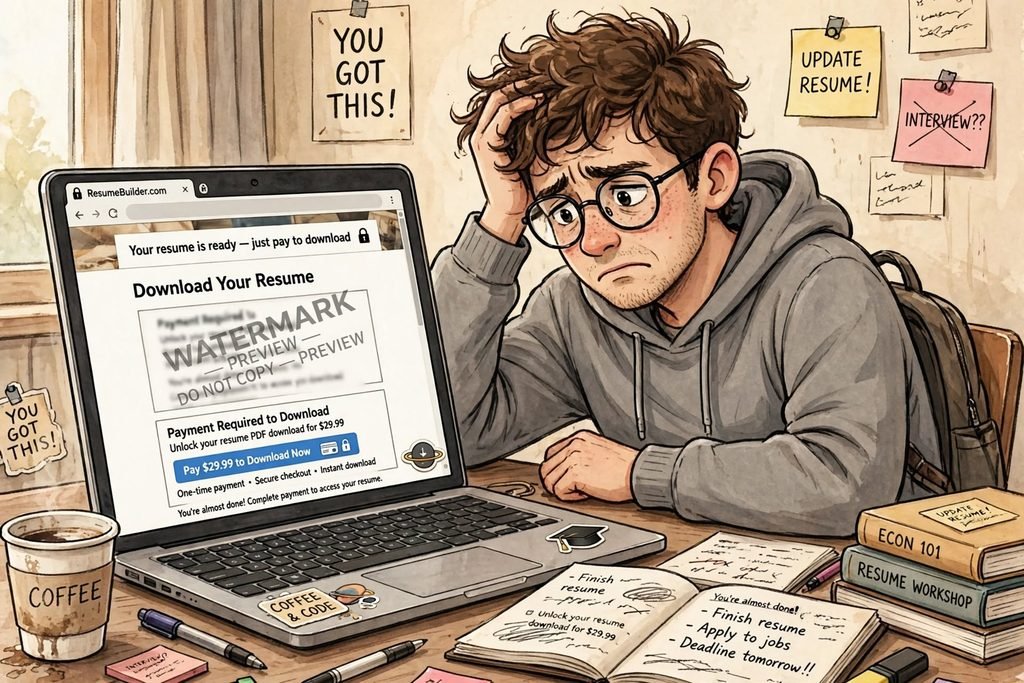
Why Most “Free Resume Builders” Are Not Actually Free
Let me break down the trick that almost every big resume website uses. It’s a marketing funnel, not a free service.
They know you are desperate. They know you need a job urgently. So they do this:
Stage 1: The Hook
They rank on Google for “free resume builder”. You click. The editor is actually free. You can add everything.
Stage 2: The Emotional Investment
You spend 1-2 hours perfecting it. You get emotionally attached. This is YOUR resume.
Stage 3: The Paywall
At the very end, when you are about to download, they ask for money. $9.99 per week, $29.99 per month. Or they let you download but with a huge “PREVIEW” watermark diagonally across your resume.
Pricing and features can change, so check the current terms before you rely on them. I checked several popular builders at the time of writing. Here are the results:
| Website | Says Free? | Actually Free? | Watermark? | Sign Up? |
| Resume.io | Yes | No | Yes | Yes |
| Novorésumé | Yes | No | Yes | Yes |
| Zety | Yes | No | Yes | Yes |
| Canva | Yes | Yes | No but not ATS friendly | Yes |
| ResumeForg | Yes | Yes | No | No |
Of the builders shown below, only 2 were actually free, and one of them was Canva, which makes beautiful but not ATS-friendly resumes.
The Hidden Danger: Watermarked Resumes Get Auto-Rejected
This is the part nobody tells you, and this is super important for your job.
Many large companies use a software called ATS – Applicant Tracking System. Think of ATS as a robot security guard. Before your resume reaches a human HR, it goes through this robot.
How ATS Scans Your Resume
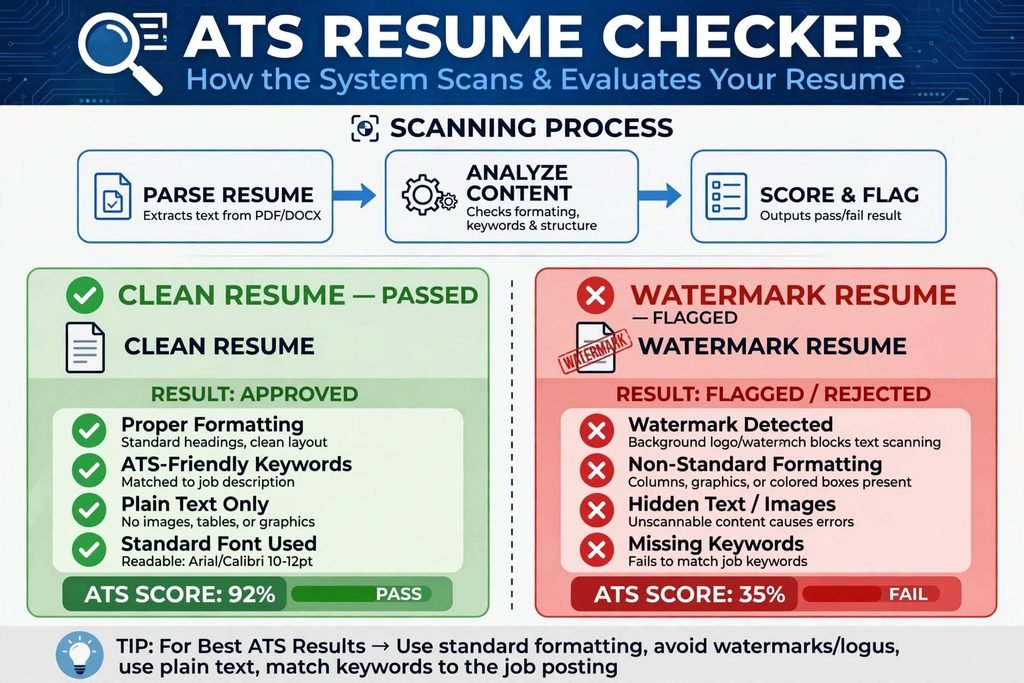
How ATS Works:
1. Parse Resume: It tries to extract text from your PDF.
2. Analyze Content: It looks for keywords like “Python”, “Excel”, “Project Management”.
3. Score & Flag: If it can read your resume clearly, it gives you a score (e.g., 85%). If it can’t, it flags you as “unreadable” and rejects you.
What happens when your resume has a watermark? A watermark is an image layered on top of text. For the human eye, you can still read the text. For the ATS robot, it’s a mess. It sees the watermark text like “PREVIEW DO NOT COPY” mixed with your real experience.
I asked a recruiter friend in Islamabad. He said unreadable resumes can be filtered out, and most of those have watermarks.
That is why ResumeForg templates are built differently. No background images. No watermarks. No text boxes. Just clean, plain text.
Who is ResumeForg Really For?
1. Students and Fresh Graduates
You have no job experience. So you need to show projects, university CGPA, skills. Our “Student” template puts your Education and Projects at the top, not your work experience at the bottom.
2. Jobless People Who Need a Job Urgently
You don’t have time to learn Photoshop. You need to go from zero to downloaded PDF in 5 minutes. No account creation. No email verification.
3. People in Pakistan, India, Bangladesh, Nigeria
Many resume builders show prices in dollars. $20 is 5500 PKR. That’s a lot. ResumeForg is free to use.
4. Privacy-Conscious People
Did you know some resume builders save your data and sell it? We don’t. Your resume data never leaves your browser. When you close the tab, it’s gone.
How to Create a Professional Resume in 5 Minutes (Step-by-Step)
Clean ATS Template Example
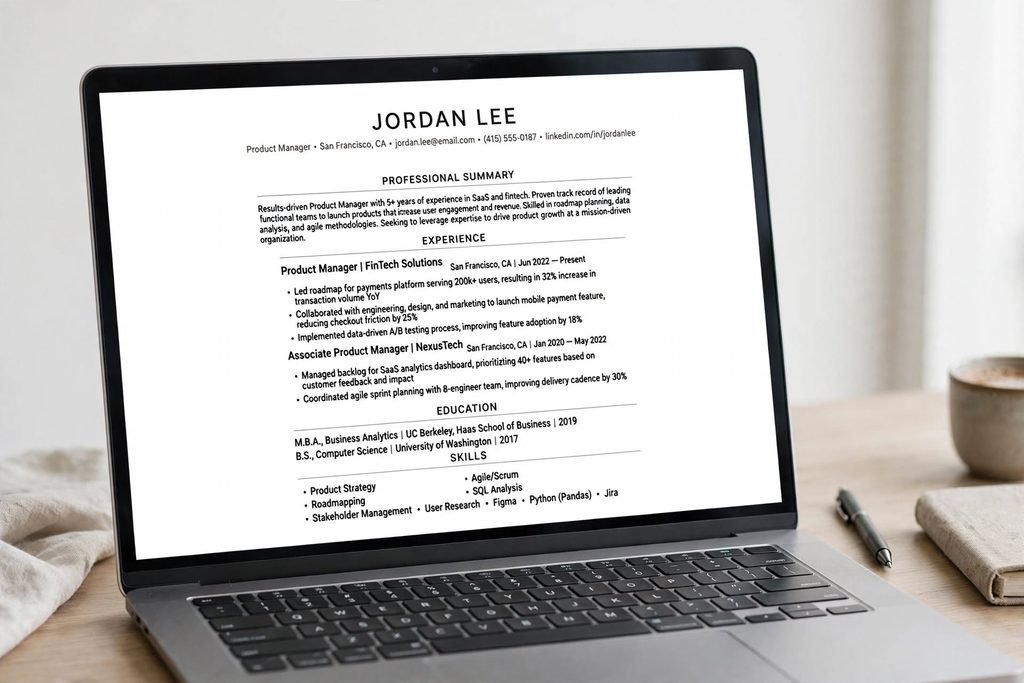
Step 1: Pick the Right Template (1 Minute)
Don’t pick the most colorful one. Pick the most readable one. For most jobs, use a single-column, black-and-white template. Avoid templates with two columns or heavy colors.
Step 2: Write Your Content Like a Recruiter (2 Minutes)
Use this formula: Action Verb + Task + Result
Bad: “I was responsible for managing social media.”
Good: “Managed Instagram page, grew followers from 0 to 4,500 in 3 months using reels.”
Step 3: The 6 Sections You MUST Have
- Header: Name, Phone, Email, LinkedIn, City
- Professional Summary: 2 lines, not an objective
- Education: Degree, University, Year, CGPA
- Skills: Technical + Soft
- Projects / Experience: Your gold mine
- Certifications: Even free ones from Coursera
Step 4: Download and Name It Properly
Don’t download as “Resume.pdf”. Name it as “YourName_Resume_JobTitle.pdf” e.g., “John_Resume_Data_Analyst.pdf”
Free Resume Builder vs Paid: Is Paid Better?
No. Paid builders charge you for fancy designs, AI content writing, and cover letter builder. Do you need those? For your first job, no.
Ladders’ 2018 eye-tracking study found recruiters spent about 7 seconds on an initial screen. In that initial screen, they look first for education, employer/university name, and skills matching the job. They don’t look at whether your template has a blue sidebar.
So a clean, free, no-watermark resume from ResumeForg can perform just as well as a paid colourful resume.
5 Mistakes That Will Get Your Resume Rejected in 2026
Mistake 1: Adding a Photo, Age, Religion
Don’t add a photo. It leads to bias and ATS can’t read it.
Mistake 2: Writing “CV” or “Resume” as Title
Your name is the title. Everyone knows it’s a resume.
Mistake 3: Making it 2-3 Pages Long
As a student, your resume must be 1 page. Only.
Mistake 4: Lying About Skills
Don’t write “Expert in Python” if you just watched one YouTube video.
Mistake 5: Using the Same Resume for Every Job
Change your professional summary and skills to match the job description. Copy keywords from the job post.
Frequently Asked Questions (FAQs)
Is ResumeForg really free with no hidden charges?
Yes, free to use. No sign up, no credit card, no watermark. We run on minimal ads to keep the server alive.
Will my resume be ATS-friendly?
Yes. All our templates are designed with standard fonts and clean formatting so ATS software can read it more easily. We use standard fonts and no watermarks.
Do I need to create an account to download?
No. That’s our main promise. Build and download instantly.
Is it safe? Do you save my data?
We don’t save your resume on our server. Everything happens in your browser.
Which template is best for students with no experience?
Use the “Student / Fresher” template. It puts Education and Projects at the top.
Try making one clean, free, no-watermark, ATS-friendly resume
Final Words: Your Job is More Important Than My Website.
Look, I made ResumeForg because I needed it. Not to become a millionaire. If you are jobless right now, I understand that anxiety. The feeling when you apply to 50 jobs and get zero replies.
Try making one clean, free, no-watermark, ATS-friendly resume from ResumeForg today. Apply to 10 jobs with it.
Your first job is waiting. Go get it.